Can AI really help my business and where do I start?
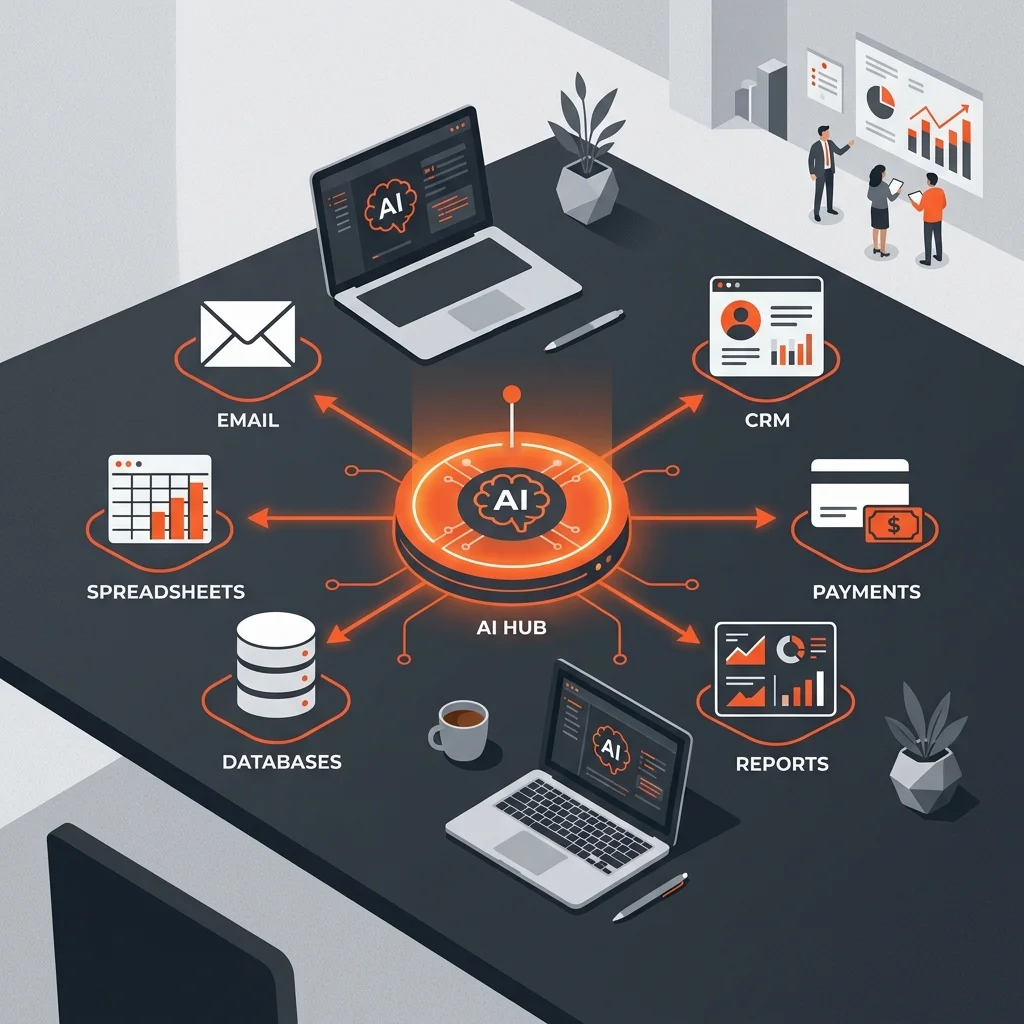
The essentials: 81% of SMBs do not use AI in 2026. Not out of rejection — because nobody has shown them where to start without unrealistic promises. The good news: starting is simpler than you think.
What you will learn:
- If AI is really useful for your business (and what it CANNOT do)
- What concrete task to start with without wasting time
- Which tool to choose according to your actual need and budget
- How to measure if it is worth it in one week
Before continuing: This article is for SMB leaders who have never used AI, or who tried once and stopped. If you already have an automation stack in production, move along — this article is for real beginners. If you sell AI solutions, you will find arguments to convince your clients. For everyone: this is a concrete guide that does not presuppose any technical knowledge.
Published on June 23, 2026
I receive messages every day from SMB leaders telling me: “I hear about nothing but AI. ChatGPT, Claude, all that. Honestly, I don’t know if it can help me, I don’t know where to start, and I don’t have 3 days to learn.”
They are right to be skeptical.
In 2026, 81.4% of SMBs do not use AI (US Census Bureau). Only 11% of Americans use it at work — and adoption has been declining since February 2025 (Stanford, May 2026). AI fatigue exists. GPT-5 was disappointing. And billions of dollars of infrastructure are threatened.
The problem: AI is sold to you as a magic wand that will triple your productivity. You test ChatGPT on a Saturday afternoon. You ask it a question. It gives you a decent answer. You don’t know what to do with it. You close the tab. And you go back to your work.
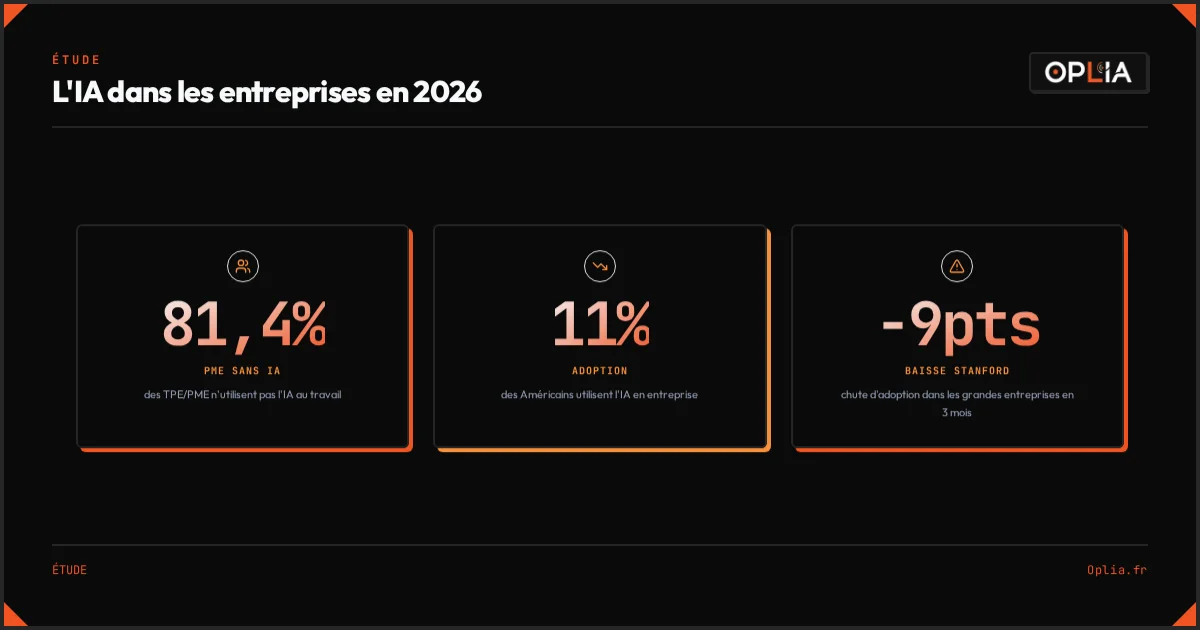
The solution: AI is not a magic wand. It is a tool. Like a screwdriver. A screwdriver does not build a house by itself — but it is damn useful for screwing in screws. AI is the same: useful on very specific tasks. You just need to know where to start.
The proof: I use AI daily in my activity. I manage prospecting, writing, quotes, part of customer follow-up, and competitive intelligence — with a stack that costs me €50 per month. I have guided SMBs through their first steps. And I made all the mistakes possible so you can avoid repeating them.
What can AI REALLY do for an SMB?
Let’s start with an uncomfortable truth: AI will not save your business. If you have a cash flow, customer, or product problem, AI will not change that.
But AI can save you time on specific tasks. Here is what it does well today:
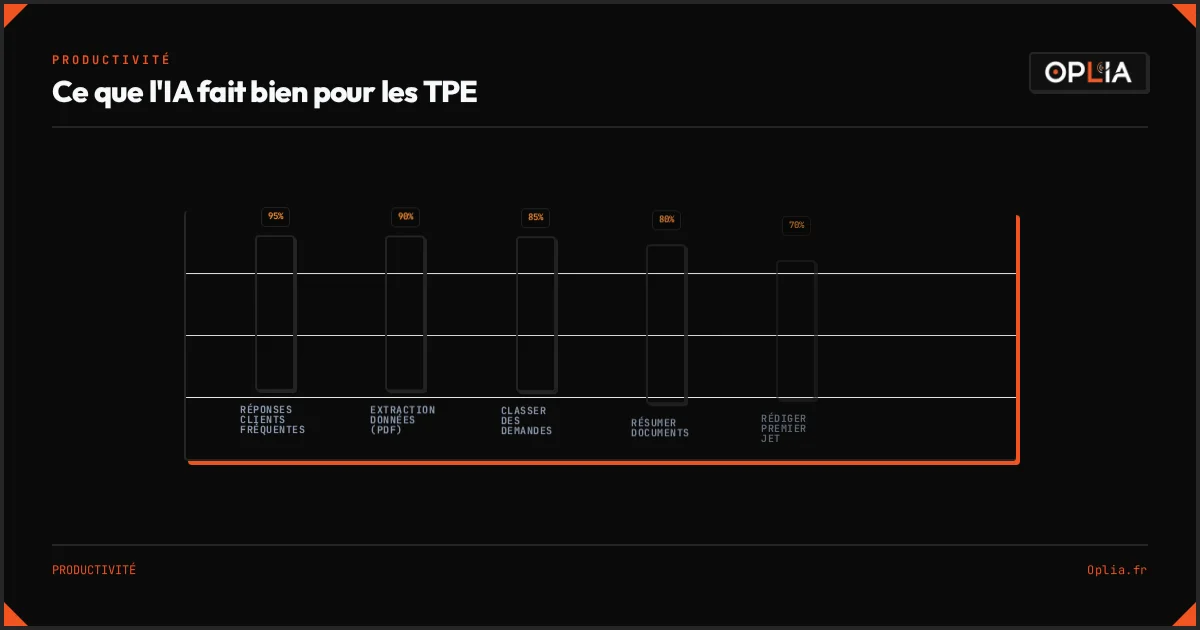
| What AI does well | Potential time saved |
|---|---|
| Draft a first email or quote draft | 70% on writing |
| Summarize a document, article, or meeting | 80% on synthesis |
| Extract data from a PDF, invoice | 90% on manual entry |
| Generate text variations (descriptions, follow-ups) | 60% on iteration |
| Classify and sort requests (emails, forms) | 85% on filtering |
| Find information in a long document | 50% on search |
| Generate simple code (scripts, Excel formulas) | 70% on development |
| Answer frequent customer questions | 95% for basic questions |
What I learned in the field: I automated quote follow-ups with n8n. Result: 3 hours a week recovered. But the mistake I made at the beginning was wanting to automate everything at once. Result: 3 workflows broken in 15 days. I unplugged everything and started again with ONE single task. It worked.
What AI CANNOT do
AI is a zealous assistant that makes mistakes with confidence. It is useless at:
- Negotiating with a customer or supplier
- Making strategic decisions for your business
- Understanding the implicit context of a 5-year customer relationship
- Replacing human judgment when the situation is unprecedented
- Managing complex workflows that require 15 back-and-forths between departments
A Carnegie Mellon study (TheAgentCompany, 2026) tested the best available AI agents on real business tasks. Result: they only succeed in 24% of complex multi-step tasks. AI is excellent on isolated blocks. It fails on long workflows requiring global context.
“AI does not replace people — it replaces tasks.” — TheAgentCompany Study, Carnegie Mellon, 2026
What this means for you: use AI to speed up what is repetitive and documented. Keep your brain for what is not.
Why do so many managers abandon AI after testing it?
The figures from the US Census Bureau and Stanford are clear: as time goes on, fewer businesses use AI. Adoption is down 9 points in 3 months in large companies (46% ➔ 37%).
Why? I have identified the three mistakes I see most often.
Mistake #1: Starting with the wrong tool
A landscaper tells me: “I tried Midjourney to make photos of gardens. The results were weird. I abandoned AI.”
Midjourney was never going to help him. He should have started with a tool for quote writing or job site description generation. He chose a hammer to drive a screw.
Mistake #2: Wanting to automate everything at once
The “super AI assistant that does everything” syndrome. You read an article about autonomous AI agents. You want a robot that handles your emails, accounting, prospecting, and customer relations. That does not exist.
From my experience: I spent an entire weekend configuring an n8n workflow that was supposed to “handle everything”. On Sunday night, nothing worked. I was disgusted for 3 weeks. The right approach: one automation at a time, tested, validated, before adding another.
Mistake #3: Not knowing what to ask
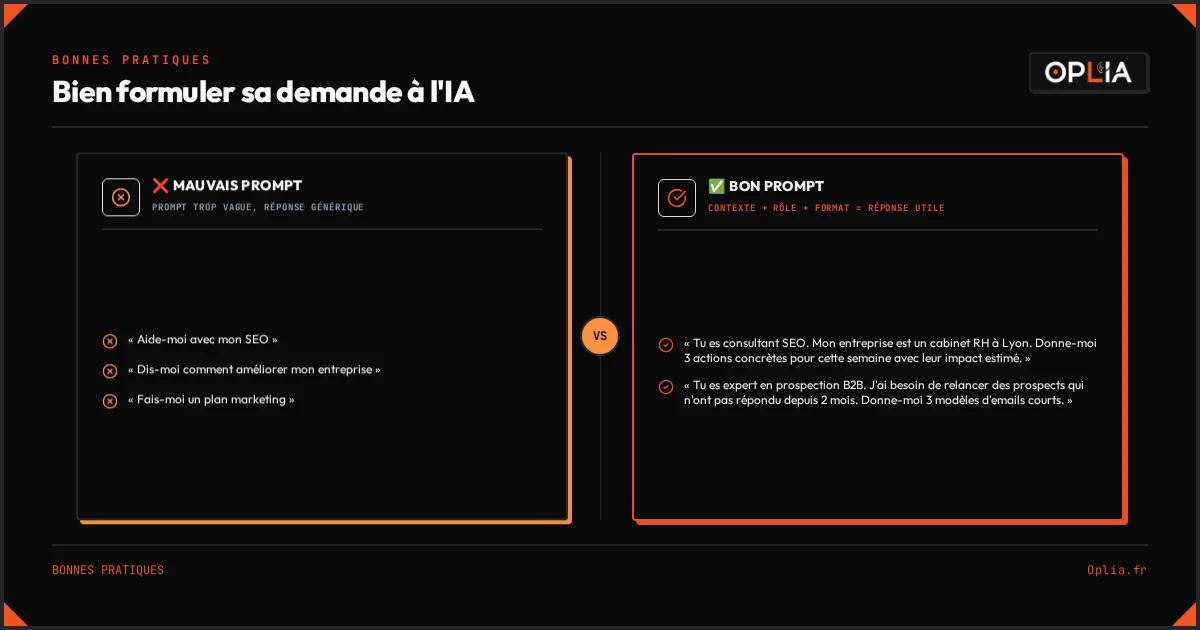
The first reflex with ChatGPT is to ask an open question: “Tell me how to improve my business.” It outputs a generic 2,000-word block of text. You tell yourself it’s wind. And you are right.
The right reflex: give a context, a role, and a precise format.
⌠“Help me with my SEO.”
✅ “You are an SEO consultant. My business is an HR consulting firm in Lyon. I have a 4-page showcase site. Give me 3 concrete actions to do this week, with their estimated impact.”
What you must do to avoid these mistakes:
- Identify a single repetitive task you do each week
- Choose the tool adapted to THAT task (not to your entire workflow)
- Formulate your request like a brief to an intern: context + role + format
Which AI tool to choose to start — and how much does it cost?
The good news: the best tools cost between €0 and €20 per month. No need for a €500 budget to start.
ChatGPT (OpenAI) — best generalist entry point
- Price: Free (limited) / €20/month (Plus)
- For whom: Everyone
- Useful for: Writing, summarizing, analysis, brainstorming, web search (ChatGPT Search)
- What changes in 2026: ChatGPT Search is integrated — the tool can search the Internet to answer. 800 million weekly users.
Claude (Anthropic) — best for long content
- Price: Free (limited) / €20/month (Pro)
- For whom: Those who write a lot (quotes, articles, proposals)
- Useful for: Long and structured writing, document analysis, reasoning
- Why: Claude surpasses ChatGPT on structured blog content writing and reasoning (tests on 73 sites with 18 generative AIs, 2026).
n8n — best for automation between tools
- Price: Free self-hosted (recommended), starting from $20/month in cloud
- For whom: Those who want to connect their tools (emails ➔ CRM ➔ spreadsheet)
- Useful for: Automating workflows without coding
- To know: 250+ free templates available to start. Around $50/month in complete stack (n8n + Hosting) vs $400/month on Zapier.
Free alternatives
| Tool | Freeness | Limit | Ideal for |
|---|---|---|---|
| Perplexity | Free | 5 pro searches/day | Searching for sourced info |
| Gemini (Google) | Free | Standard | Analyzing Google Docs |
| DeepSeek | Free | Limited | Experimenting with reasoning |
| Mistral AI (Le Chat) | Free | Standard | French alternative |
The golden rule for choosing
If you had to pick only one: ChatGPT Plus at €20/month. It is the Swiss Army knife. In 3 months, if you really use it, add Claude for writing or n8n for automation.
Tip: Never subscribe to more than 2 paid tools at the same time. Take one, use it for 30 days, and if you are still using it after 30 days, add the second. 80% of people keep 1 tool after 3 months — the rest sleeps in bank statements.
How to start concretely? The 1-week plan
Enough theory. Here is a plan you can follow starting today.
Day 1-2: Identify your most time-consuming task
Take a sheet of paper. List everything you do in a week. Next to each task, note two things:
- How much time it takes you
- How repetitive it is (1 = different every time, 5 = exactly the same)
Your priority candidates are tasks with “high time + high repetition score”.
Example for a craftsman:
| Task | Time/week | Repetitive (1-5) |
|---|---|---|
| Respond to quote request emails | 3h | 5 |
| Draft job site descriptions | 2h | 3 |
| Accounting / invoice entry | 2h | 5 |
| Phone prospecting | 1h | 2 |
| Manage schedules | 1h | 3 |
Priority: responding to quote emails (3h + repetitive 5).
Day 3: Create your ChatGPT Plus account
- Go to chatgpt.com
- Create an account, get the Plus subscription at €20/month
- Ask your first question on the targeted task
Your first prompt:
“You are [your trade]. I received this request: [copy email]. Write a professional response in [tone] explaining [what you offer] and asking for [missing info]. Maximum 5 sentences.”
Day 4-5: Test on real cases
Use ChatGPT on 3 to 5 real cases of your targeted task. Time the saved time.
If you save at least 20 minutes per task on a volume of 5 tasks per week ➔ you recover nearly 2 hours per week. In a year, that is 100 hours.
Day 6-7: Decide
Two possible scenarios:
- You saved time ➔ continue. Add a second prompt for another task.
- It didn’t work ➔ change tasks or tools. AI is not for everyone, nor for all tasks. Try Claude if the issue was writing quality. Try Perplexity if you are searching for sourced info.
From my experience: One of my clients took 15 days to find his ideal AI task. He started with “prospect follow-up”, it didn’t work (too contextual). He tried “writing meeting summaries” — bingo. 4h a week recovered. The right task is not always the first one you choose.
How to measure if AI is really paying off?
The temptation is to say “I feel like it’s going faster”. That is not a measurement.
What you must do to measure:
- Time the time before AI on a task (3 repetitions, make the average)
- Time the time with AI on the same task (3 repetitions)
- Calculate the time gain per task
- Multiply by the number of times you do this task per week
- Multiply by 45 weeks (subtracting vacation)
Concrete example:
- Before AI: 25 minutes per quote email
- After AI: 8 minutes (first draft + review)
- Gain: 17 minutes × 10 quotes/week = 170 min/week
- 170 min × 45 weeks = 7,650 minutes = 127 hours per year
If you value your time at €50 an hour (modest rate for a manager), that is €6,350 of recovered time per year, for a €240 ChatGPT subscription (€20 × 12 months). And that does not count the additional clients won because you respond faster.
Key Takeaways
- 81% of SMBs do not use AI — you are not late, you are in the majority
- AI does not replace an employee — it replaces repetitive and documented tasks
- Start with ONE single task — time-consuming, repetitive, well-defined
- A single €20/month tool is enough for the first 3 months — do not scatter
- Measure the saved time before deciding if it’s worth it
AI will not save your business. But 127 hours a year will.
To go further
- 3 concrete automations I wish I knew before launching my business — concrete examples without code
- Can AI really save me time? — the trap of “more volume instead of less work”
- My website does not appear on Google: where to start? — if digital invisibility is your real problem
Need local support? Discover our service areas across France.