Can I Build My Own Tools Instead of Paying for Expensive Subscriptions?

The bottom line: A small business paying for SaaS subscriptions (CRM, e-signature, email marketing, prospecting, quoting) ends up spending €300 to €1,500 per month. The good news: 70–90% of these tools can be replaced by homegrown automations with n8n and AI. Without knowing how to code.
What you’ll learn:
- Which subscriptions you can concretely replace, tool by tool
- How to do it with n8n and AI — even without writing a single line of code
- How much it really costs to DIY (spoiler: almost nothing)
- Where to start without failing on your very first tool
Before you continue: This article is aimed at small business owners who already pay for at least 3 SaaS subscriptions and are wondering if there’s an alternative. If you have 0 subscriptions or if digital tools stress you out, start with the essentials first.
Published July 9, 2026 • Updated July 9, 2026
Two years ago, I was still running my business with a mix of Google Sheets and paid software that I eventually stopped using. I was paying €30/month for an e-signature tool, €50 for a CRM I opened once a week, €80 for an email marketing service… In total, nearly €400 a month vanishing into subscriptions I kept forgetting to cancel.
The problem: These tools are built for teams, not for a small business. You’re paying for features you only use 20% of.
The solution: Build your own tools with open-source automation platforms like n8n. Free, self-hosted, and plugged into AI to do the intelligent work.
The proof: I replaced 6 subscriptions with n8n workflows. Net savings: about €250/month. Time spent setting everything up: one weekend.
Why Do SaaS Subscriptions Weigh Down a Small Business Budget?
The problem isn’t the subscription itself. It’s the accumulation. A typical small business easily racks up:
| Subscription | Monthly Price | Actual Usage |
|---|---|---|
| E-signature (DocuSign, Pandadoc) | €30–50 | 5–10 uses/month |
| CRM (HubSpot, Pipedrive) | €50–150 | Basic contacts + pipeline |
| Email / newsletter (Mailchimp, Brevo) | €30–80 | 2–3 campaigns/month |
| Automated prospecting (Apollo, Instantly) | €100–300 | Phased campaigns |
| Scheduling (Calendly) | €15–30 | Simple appointment booking |
| Invoicing (Henri, Dougs) | €10–30 | Auto invoices |
| RSS / brand monitoring | €20–80 | Competitive intelligence |
| Total | €250–720 |
And that’s just the visible layer. The accounts you forget about, the annual price hikes, the paid features you never use.
“I audited a landscaper client’s accounts: he had 11 active subscriptions totaling €680/month. Only 4 were actually useful to him.” — From my experience with small businesses
What this means for you: you’re not paying for a service, you’re paying to not have to do it yourself. That’s legitimate — but alternatives exist and cost 10 to 20 times less.
In its research on the evolution of SaaS costs, the n8n blog confirms that the number of tools per company keeps growing, and that self-hosted automation is becoming the natural answer to subscription inflation (n8n Blog, 2026).
Which Subscriptions Can Easily Be Replaced by Your Own Tools?
Not all subscriptions are equal. Some are nearly impossible to replace (major platforms like Google Workspace, banking services). Others are surprisingly simple.
Here are the 6 I replaced, in increasing order of difficulty:
1. E-signature — The Easiest
Subscription: €30–50/month (DocuSign, Pandadoc)
Alternative: An n8n workflow + signature link via your own server
n8n lets you receive a PDF, send it by email with a secure link, and automatically archive the signed version. You don’t need to be a certified e-signature provider for 95% of use cases (quotes, signed estimates, simple contracts).
Setup time: 2 hours Cost: €0 (n8n already installed) Savings: €30–50/month
The open-source alternative is exploding: the community building its own tools with open-source building blocks is gaining ground. A popular Reddit thread on alternatives to Zapier lists n8n as the top recommendation to replace paid connector SaaS tools. (Reddit, “What are alternatives to Zapier”, 2026)
2. Transactional Emails and Newsletters
Subscription: €30–80/month (Mailchimp, Brevo, Sendinblue)
Alternative: Self-hosted Resend, or direct transactional SMTP
Resend offers 100 free emails/day. For a small business sending 2–3 newsletters per month and automated emails (quote confirmation, follow-up, invoice), that’s more than enough.
Setup time: 1 hour Cost: €0 (Resend free tier) Savings: €30–80/month
3. Basic CRM
Subscription: €50–150/month (HubSpot Pro, Pipedrive)
Alternative: Twenty CRM (open-source), self-hosted, or Airtable (free version)
Twenty CRM is a lightweight, self-hostable, open-source Salesforce clone. It does the job: pipeline, contacts, notes, follow-ups. No advanced features — but you probably don’t need them.
Setup time: 4–6 hours Cost: €0 + server (~€5/month) Savings: €45–145/month
4. Appointment Scheduling
Subscription: €15–30/month (Calendly)
Alternative: A Cal.com link (open-source, self-hosted) or a simple booking button in your contact form
Cal.com does exactly the same thing as Calendly. Clean interface, calendar sync, automatic reminders.
Setup time: 30 minutes on a VPS Cost: €0 + existing server Savings: €15–30/month
5. Automated Prospecting
Subscription: €100–500/month (Apollo, Instantly, Lusha)
Alternative: n8n + scraping + AI (Claude API or DeepSeek)
This is the most impressive tool I built. An n8n workflow that scrapes Google Maps or a directory (public data), qualifies each lead with AI, and sends personalized emails automatically.
I documented it for a real case: a client replaced an SDR position ($4,500/month) with a Claude API + n8n automation at $300/month — based on feedback shared on the B2B Marketing subreddit (Reddit, 2026). The gap is enormous.
Setup time: 8–12 hours Cost: €2–20/month in LLM API calls Savings: €100–480/month
What I learned in the field: A client absolutely wanted to keep his €150/month Instantly subscription. We ran a test: the same number of emails with n8n + self-hosted SMTP for 30 days. Result: equivalent deliverability, cost divided by 10. He canceled the next day.
6. Invoicing and Follow-ups
Subscription: €10–30/month (Henri, Dougs)
Alternative: n8n + automatic PDF generation + email sending
A workflow that listens to a Google Sheets form (or an Airtable base), generates an invoice PDF, sends it to the client, and schedules automatic follow-ups at D+7, D+15, D+30.
Setup time: 4 hours Cost: €0 Savings: €10–30/month
“The follow-up module saved me two hours a month and I reduced my unpaid invoices by 40%.” — A small business I work with
Do You Need to Know How to Code to Build Your Own Tools?
No. And that’s the key point.
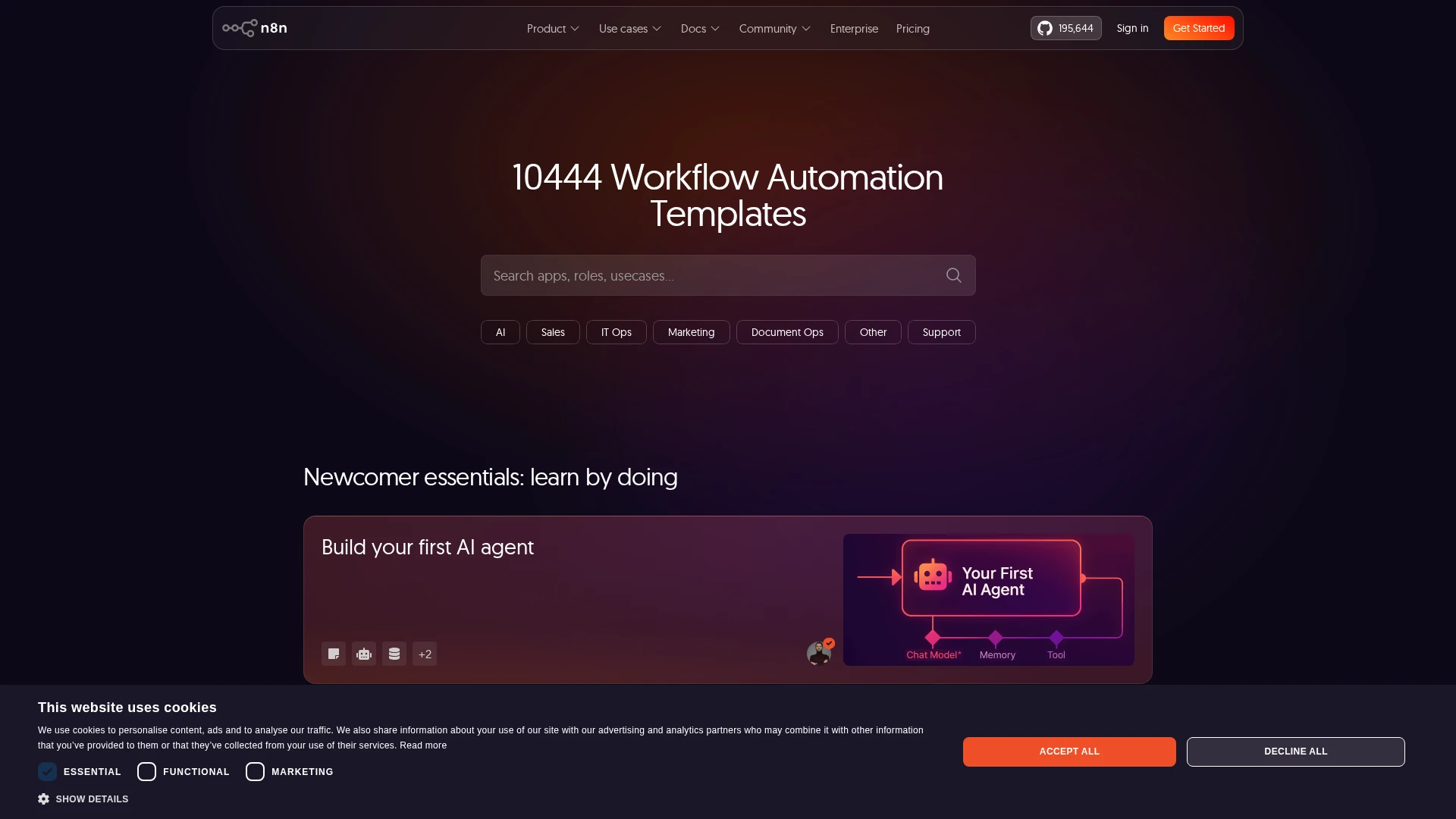
n8n is a visual platform: you connect blocks together with your mouse. One block = one action (send an email, read a database, call an API, generate a PDF, send an SMS).
What you need to know how to do:
- Navigate an interface (you’re reading this article, you’re good)
- Understand what you want to automate (the real work)
- Read and copy-paste a URL
- Click “Test” and “Save”
What you don’t need to know:
- How to code
- How to manage a server (hosting providers like Railway or Hetzner do it for you)
- How to understand APIs
- How to manage security (n8n handles secure connections)
The practical guide published on the n8n blog shows that most business workflows can be built without writing a single line of code — just by connecting blocks together. (n8n Blog, 2026)
“The real work isn’t the technical part. It’s knowing what you want to automate.” — From my experience
For cases where a small script is needed, AI generates the code automatically. You copy-paste into n8n or into a file. Literally: “Generate a Python script that extracts phone numbers from this CSV file.” You write it, paste it, it works.
What Concrete Tools Can You Build With AI Without Writing a Single Line of Code?
Here are examples I’ve built that are running in production for clients:
Lead Qualification Assistant
n8n receives a new contact (website form, incoming email). It sends the info to Claude/DeepSeek which analyzes the intent, qualifies the lead (hot/warm/cold), and sends an appropriate automated response.
Automated Quote Pipeline
Client fills out a form → AI analyzes the need → n8n generates a personalized quote PDF → sends it by email → schedules a D+3 follow-up.
Automated Competitive Intelligence
n8n monitors Google results (via scheduled search), captures your competitors’ pages, extracts key information with AI, and sends you a weekly summary by email.
In its guide on automation tools, Moz also recommends this type of approach: start by identifying repetitive tasks, then automate them with visual blocks, with no need for advanced technical skills. (Moz, “How to Build AI Tools to Automate Your SEO Workflows”, MozCon 2025)
| Homegrown Tool | What It Replaces | Build Time | Monthly Savings |
|---|---|---|---|
| Lead qualification assistant | Junior SDR / manual prospecting | 4–6 hours | €200–500 |
| Auto quote pipeline | Administrative assistant | 4 hours | €100–200 |
| Competitive intelligence | Monitoring tools (€20–80/month) | 3 hours | €20–80 |
| Quote e-signature | DocuSign / Yousign | 2 hours | €30–50 |
| Auto overdue follow-ups | Invoicing + follow-ups | 3 hours | €10–30 |
| Total | 5 subscriptions | ~18 hours | €360–860 |
A weekend of work to save up to €860 per month. The return on investment is immediate.
Can n8n Really Replace Subscriptions Costing €100–500/Month?
Yes — with an important nuance.
Self-hosted n8n (Community Edition) is free. The only costs are:
- The server: €5–10/month on Hetzner or DigitalOcean
- LLM APIs: €2–20/month depending on volume (DeepSeek is 10 times cheaper than GPT)
- External services: Resend (€0–10/month), SMTP (included with hosting)
For €15–40/month, you get the equivalent of €300–700 in SaaS subscriptions.
However, the Business version of n8n now bills per execution — a model that caused a stir in the community. A seasoned n8n user even threatened to leave the platform after the self-hosted Business tier switched to a per-execution model, arguing it betrayed the promise of self-hosting. (Reddit, “n8n’s new self-hosted pricing”, May 2026)
The solution? Stay on the Community Edition. It’s free, unlimited executions, no limits. If you need enterprise features (RBAC, advanced logs), the cost remains far lower than equivalent SaaS subscriptions.
An American developer shared a complete guide to self-hosting n8n on Google Cloud’s free tier — zero monthly cost with enterprise-level security. (Reddit, “Self-hosting n8n on Google Cloud free tier”, 2026)
How Much Does Building Your Own Tools Cost (vs. Subscriptions)?
I did the exact math on my own stack. Here are the numbers:
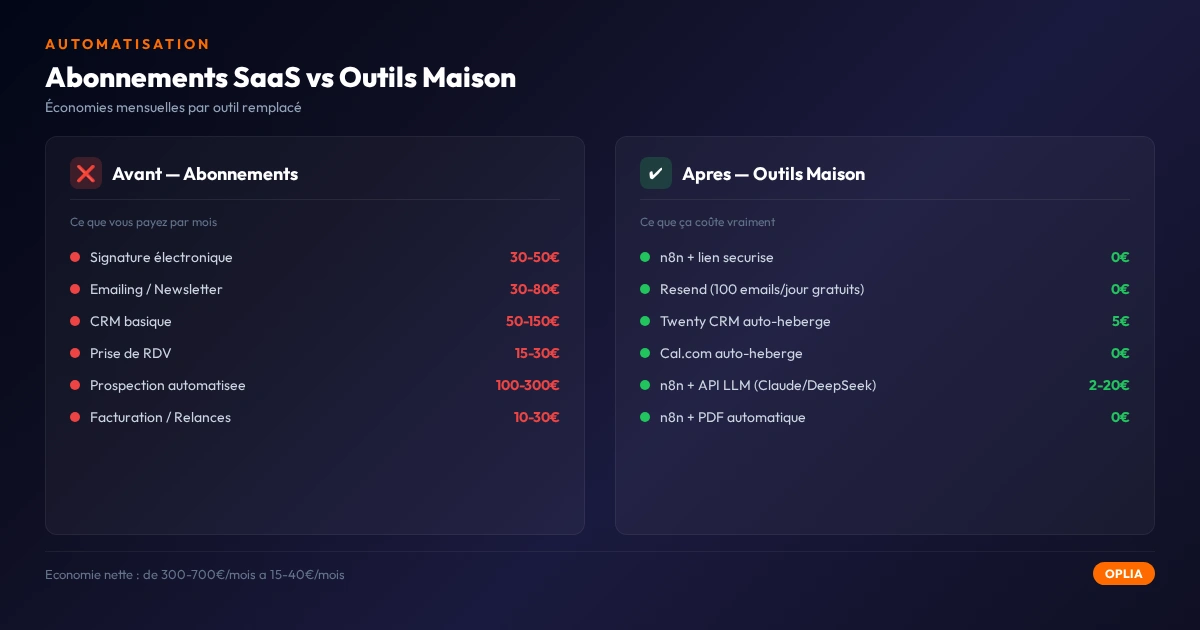
| Item | Before (subscriptions) | After (homegrown tools) |
|---|---|---|
| E-signature | €45/month (Pandadoc) | €0 |
| Email / newsletters | €35/month (Mailchimp) | €0 (Resend free) |
| CRM | €60/month (HubSpot) | €5/month (Twenty + server) |
| Prospecting | €150/month (Apollo) | €10/month (LLM API) |
| Appointment scheduling | €20/month (Calendly) | €0 (self-hosted Cal.com) |
| Invoicing / follow-ups | €25/month (Henri) | €0 |
| Total | €335/month | €15/month |
| Yearly | €4,020 | €180 |
Net annual savings: €3,840.
And that’s just the first month. Every new tool replaced further reduces the bill.
The most recent AI models (DeepSeek V4 Pro) have cut their prices by 75% in 2026 (Reddit, “Chinese AI labs cut token prices up to 99%”, June 2026), making AI integrated into workflows virtually free to use.
What Are the Risks and Limitations of This Approach?
I’m not going to sell you a dream. Building your own tools has three real limitations:
1. Maintenance Time
A SaaS subscription just works, all the time. A homegrown tool requires monitoring. If an n8n workflow breaks at 10 PM on a Sunday, you’re the one fixing it.
Solution: Start with non-critical processes (quote signatures, not your main CRM). Validate for 30 days. If it holds up, add another. If it breaks, you’ll know what went wrong.
2. Data Security
Storing hard-coded passwords in workflows? Bad idea. n8n manages credentials securely (environment variables, built-in vault). But it’s your responsibility.
Golden rule: Never put an API key, password, or token in plain text in a workflow. Use n8n credentials or your password manager.
3. No Support
No chatbot, no ticket, no “We’ve resolved your issue” email. If it breaks, you are your own support.
Solution: The n8n community is huge and active. For every problem, a Google search gives you the answer. And if you entrust me with the setup, I handle maintenance for you.
What I learned in the field: The first time I automated quote signatures, the workflow broke because of a bad PDF format. I spent two hours debugging. Since then, I always add a “format check” block before sending. The second time, zero problems.
How to Get Started Without Failing?
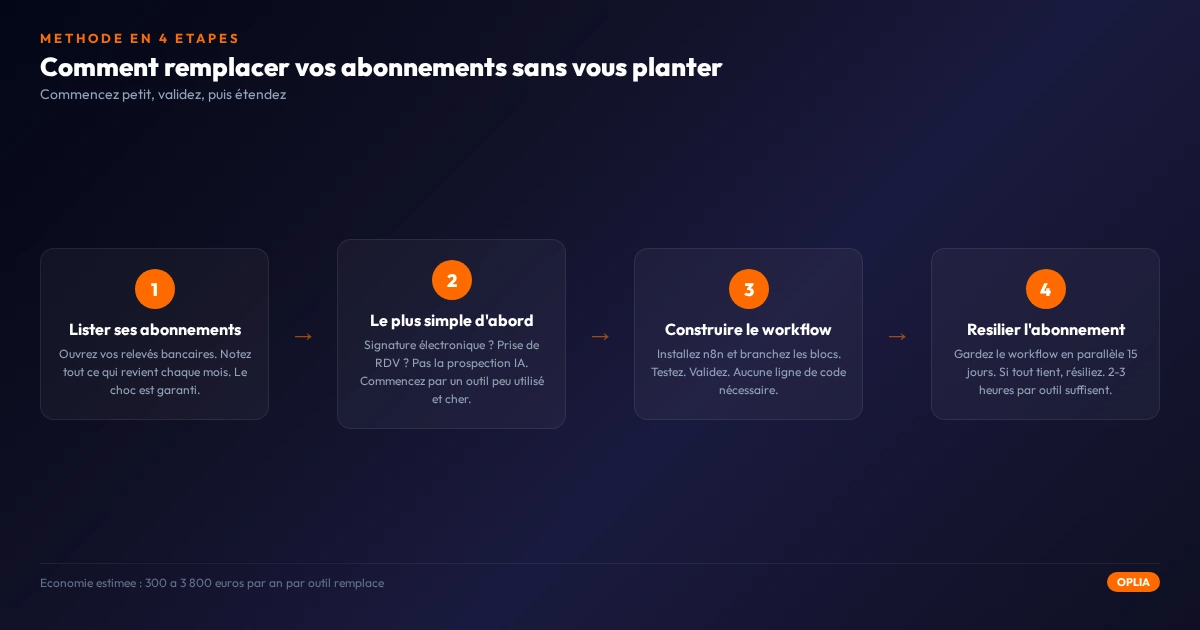
The 4-Step Method
- Step 1: List your subscriptions — Open your bank statements. Note EVERYTHING that recurs every month. You’ll be surprised by the number.
- Step 2: Identify the easiest to replace — E-signatures? Appointment scheduling? Not AI prospecting — save that for later. Start with a tool you use little and that costs a lot.
- Step 3: Set up the first workflow — Install n8n (or have a professional do it). Build the workflow. Test. Validate.
- Step 4: Cancel the subscription — Keep the workflow running in parallel for 15 days. If everything is fine, cancel.
Summary — Checklist
| # | Action | Done? |
|---|---|---|
| 1 | List all your active bank subscriptions | ☐ |
| 2 | Spot the 3 easiest tools to replace (e-signature, scheduling, email) | ☐ |
| 3 | Install n8n (Community Edition, self-hosted or on a €5/month server) | ☐ |
| 4 | Build the first workflow (quote signature or email follow-up) | ☐ |
| 5 | Test in parallel for 15 days | ☐ |
| 6 | Cancel the subscription | ☐ |
| 7 | Move on to the second tool | ☐ |
Interpret your score:
- 0–2: You’re still in the thinking phase. Do Step 1 tonight — 15 minutes is enough.
- 3–5: You’ve started. Well done. The first workflow is the hardest; the next ones are 3 times faster.
- 6–7: You’ve freed up your SaaS budget. You’re probably already saving €100–300/month. On to the next tool.
Key Takeaways
- 70–90% of a small business’s SaaS subscriptions can be replaced by homegrown tools with n8n and AI
- No need to code — n8n is visual, AI writes the scripts
- Cost drops from €300–700/month to €15–40/month — that’s €3,000 to €8,000 in savings per year
- The real risk is maintenance time, not the technical side
- Start small — a single non-critical workflow, validate for 30 days, then expand
The hardest part isn’t the technical side. It’s taking 30 minutes to look at your bank statements and thinking, “Am I still paying for this?”
If you’d like us to audit your stack together and identify the 3 easiest subscriptions to replace, I can do it in 30 minutes. No commitment. No sales pitch. Just a diagnosis.
Going Further
- Automate Your Administrative Tasks Without Coding — The basics of automation for small businesses
- How AI Can Really Help a Small Business Get Started — Where to start with AI, concretely
- Sign More Quotes Without Hiring — Automate prospecting and signing
- Professional Customer Service (Even on a Small Budget) — Customer support without paying for a €200/month CRM
A subscription isn’t a solution. It’s just a bill that lands every month. If it doesn’t bring in more than it costs, replace it or kill it.
Need local support? Discover our service areas across France.